Clients & Matters FAQ & Troubleshooting
Frequently asked questions and troubleshooting for clients and matters in TimeSolv.
The Client label may be displayed as Client, Customer, or Respondent depending on your TimeSolv Configuration in Clients>Settings>General. This can change path and report terminology.
The Matter label may be displayed as Case, Engagement, Job, Matter, or Project depending on your TimeSolv Configuration in Clients>Settings>General. This can change path and report terminology.
The Professional label may be displayed as Associate, Consultant, Employee, Fee Earner, Professional, Resource, Staff Member, and Timekeeper depending on your TimeSolv Configuration in Account>Settings>General. This can change path and report terminology.
How do I Move a Matter to Another Client?
Void invoices and unallocate payments first, then use Copy/Move on the Time Search screen to shift all of a matter's time entries to a different client-matter.
First, create the new Matter where you will need to move the entries.
Before proceeding, ensure any invoices against the Matter being moved are voided, and any payments unallocated.
Click under Time>Search.
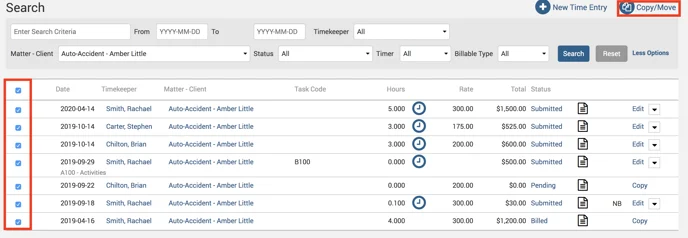
In the search criteria fields, leave the date fields open and specify the Matter you want to move to another Client, and hit Search.
Select the topmost checkbox to select all entries.
Click on Copy/Move button on the top right.
You can now specify the Client-Matter to move to.
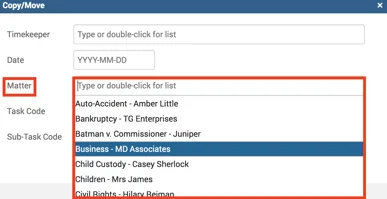
Click on the ‘Move‘ button.
Now all Time Entries have moved to the other Client-Matter.
I cannot delete a Client, Matter, or Professional.
Please check for the following if an error pops up when deleting a Client, Matter, or Professional:
- Error “Could not delete Client due to its usage in Matter” when deleting a Client.
- A Client cannot be deleted if it has Matter information associated with it or outstanding payments.
Additionally, if you want to mark the Client as “Inactive,” it cannot have any of the following:
- Unbilled time/expense entries
- Unpaid Invoices
- Opening balance
- Unallocated credits
- Trust balances
- Error: “Could not delete Matter. It has been used in Invoice, Expense Entry, Time Entry and Document.” when deleting a Matter.
- The Matter has Time entry and/or Invoice related information associated with it. Matters cannot be deleted unless all linked transactions have been deleted.
If you want to mark the Matter as “Inactive,” it cannot have any of the following:
- Unbilled time/expense entries
- Unpaid Invoices
- Unallocated Credits
- Trust Balances
- Error: “This record is used by other records and cannot be deleted – please remove all references and try to delete again.” when deleting a Professional.
- Professionals with time/expenses recorded in the system cannot be deleted.
- Error: “This Professional is an active Approver. To inactivate this Professional, please first inactivate or delete Approver settings of this Professional.” when marking a Professional as “Inactive:”
- The Professional cannot be an “Active Approver. The Approver settings must be turned off in order for the Professional to be inactive.