Account Management FAQ
Frequently asked questions about account management in TimeSolv.
What is the Difference Between TimeSolv Legal and Pro Versions?
TimeSolv Legal has the following additional features not included in the Pro version:
What are the Terms of Service?
Click here to view the Terms of Service.
Is my data secure?
Your data is secured by many layers of physical and electronic protections.
- The data is stored in a secure data center that is guarded 24 hours a day, 7 days a week.
- Your data is transmitted only via SSL, the most securely encrypted web protocol available.
- Furthermore, your password is never stored in clear text format. It is encrypted so that not even TimeSolv can read it.
- We offer two-factor authentication.
- Finally, TimeSolv customer support reps only have access to your TimeSolv account information. All information about your clients, projects, and billing is completely unavailable to them. The only way they can access your data is if you chose to assign them a temporary login and password to help you with an issue.
“Your Free Trial Period Has Expired!” How do I subscribe?
To continue to work when your free trial period has expired, please add a payment method to subscribe to TimeSolv.com.
Can I change my billing plan?
Yes, you can change your billing plan at any time. However, the plan will not take effect until the next billing cycle.
To change your billing plan, contact TimeSolv’s support team
What is the TimeSolv Subscription Billing Cycle?
The billing cycle for TimeSolv services is monthly. It starts on the first of the month and ends on the last day of the month. TimeSolv bills on the first of the month per the services provided during the prior month.
What if I join during the Billing Cycle?
If you join during the billing cycle, your first month’s fee will be pro-rated.
What if I forget my password?
If you forget your password, click the Forgot Password? to recover the password. Upon clicking the Submit button, an e-mail Forgot Password will be sent to the specified valid e-mail address within TimeSolv. Click the link in the e-mail to reset the password.
Note: An Admin user can reset any user’s password under Account>Professionals>[username]>Change Password. Additionally, if two-factor authentication is enabled for your account, see here for more information on how to log in.
Can I Check How Much I Have Spent This Month?
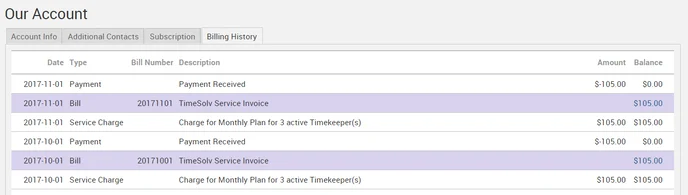
Your Billing History shows an overview of all incoming and outgoing transactions, including invoice numbers, type of payment, date, description, amount, and balance. It’s a quick and easy method of reviewing and managing your billing info without having to wait for the relevant representative to get you the information you need.
Click under Account>Our Account>Billing History.
How do I terminate my service with TimeSolv?
We are sorry if you are closing your account. Please contact Customer Service at 1.800.715.1284 Ext. 2 or support@timesolv.com to terminate service.
How do I set up the Automatic Data Export feature (Backups)?
At a cost of $19.95, a backup of your data will automatically take place depending upon the Backup Frequency you have specified.
To set up the automatic data export feature, go to Account>Import/Export>Backups tab.